KB0019 - Allow users with administrative privileges to modify
the HKEY_CLASSES_ROOT key in the Window registry
The information in this articles applies to:
•
Living Cookbook (all versions)
•
Windows XP Home Edition and Windows XP Professional
Note
This procedure is not required for most users. It is only required
if your computer is configured in such a way that the Living Cookbook
installation program cannot access the Windows registry due to permissions
issues (almost never).
Procedure
1.
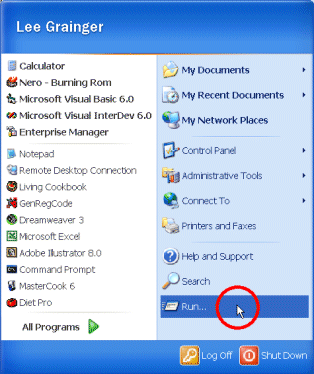
Click the Start menu and then click Run.
2.
In the Open box type REGEDIT. Click OK.
3.
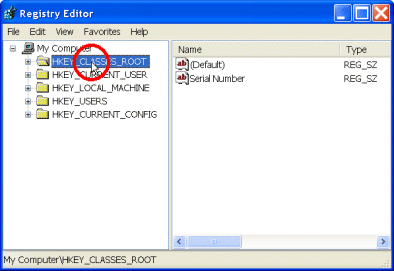
Select HKEY_CLASSES_ROOT.
4.
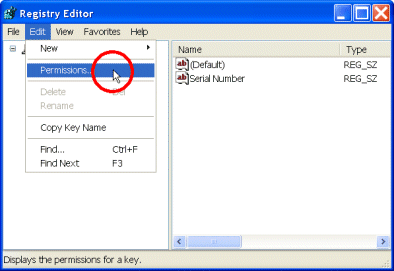
On the Edit menu, select Permissions.
5.
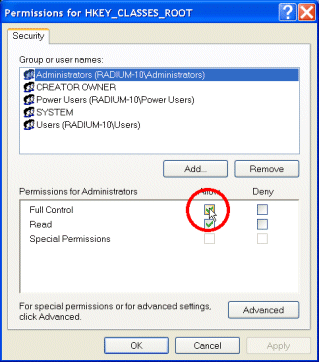
Select Administrators.
6.
Check the Allow checkbox next to Full Control.
Click OK.
7.
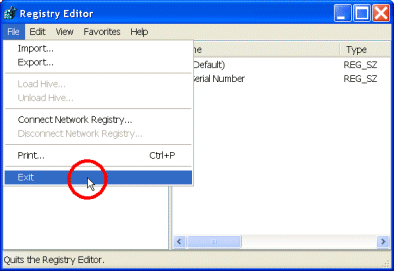
To close the Registry Editor, on the File menu click
Exit.